
Weekend Notes (Jul 04, 05)
Last Updated 6th Jul 2026
Haiku OS
Recently was watching a video from The Art of The Terminal Channel, where he was explaining Why Ugly Things Works, and ideal, elegant solutions doesn’t take off to scale for e.g. Python vs Lisp, C++, and BeOS vs others. This is my first time hearing about BeOS, which seems to have come in 90’s and labelled as a Media OS i.e., which supports working with media effectively and effciently (which implies that it will be better in other tasks too), it had pre-emptive multi tasking, being shipped as whole including OS, Kernel, Desktop Environment, etc better than Windows (In the 90s itself), and was supposed to be used in Mac, if Job’s NeXT hadn’t come up and so later its market fell down and they made it open source and people started developing from it and eventually forked and now we have the currently supported Haiku OS, the modern BeOS.
It’s still fast, light, comes as a single OS along with everything, it does even have all the important software ports such as Emacs, mpv and yt-dlp, which helps to watch YT videos without even going to YT page (I was trying to force myself to be within Emacs and watch YT, using yeetube package, search videos and watch it with mpv + yt-dlp but couldn’t sustain it though) and has a elegant 90’s look and also a Active Community (Discourse, Matrix - IRC Bridge)
So wanted to try it and had setup a VM in VMM(Virtual Machine Manager) and here’s how it is,

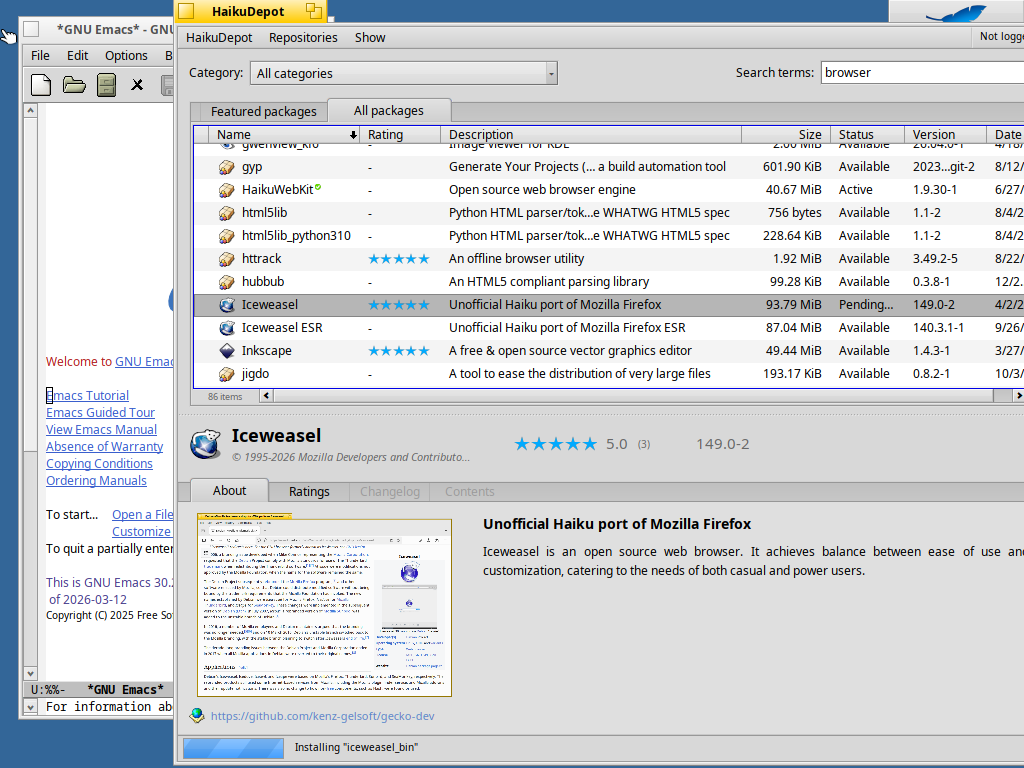
From the subreddit, found BeOS Bible read by the users for getting to know about the BeOS elegance. Have to read it. Probably planning to use it as a daily driver first in a VM and see how it goes and also be active with the community and try contributing.
It also had some async communication across applications, per window threads which might look common now but back in 90’s, it’s way ahead it seems.
DIY Pocket eInk Reader
I am planning to develop in this way like,
- Software
-
Integrate SD Card Reader SPI module with that of Waveshare 2.9” eInk display and get the loop done, like when I press a button then it needs to read a chunk, clear framebuffer, copy to it and send to display via SPI again.
-
Improve other Hardware UI logic, Books Sync via Hotspot, etc.,
-
Improve Efficieny by using sleep modes, etc.,
- Hardware
- Get smaller ESP32 boards with minimal pins, possibly have a Battery Management ICs and also Figure out Power Supply, Charging, etc
- Case Design and Assembly
-
Learn Solid Modelling i.e., How to design mechanical structures and fits for 3D prinitng.
-
3D Print the Case, Assemble Hardware, do Hardware Tests and Finally Use it :) (Possibly use FreeCAD or other Open Source softwares)
For Software stack, I’m going with ESP-IDF, so that I can fully understand the driver level interactions, managing toolchain etc.
As a first task I was trying to interface SD Card with ESP32 and thought of reading some text from Pride and Prejudice book in .txt format (converted it to .txt to avoid EPUB overheads). I had following issues and observations and finally got it working,
-
ESP-IDF by default only supports FAT partition and not exFAT, so had to format my 64 GB SD Card[1].
-
You need pull-up resistors for MISO, CLK, CS pins of 10k ohms for 3.3V, I don’t know exactly what sort of calculation is it and why we need 10k ohms[1].
-
But then also it didn’t work like it couldn’t verify the CRC hashes and found that,
-
Adding 10k resistor helps in reducing the overall resistance from 10k to (10k parallel 50k) (internal pull up resistor) and so it reduces the RC time constant there by allowing to run at 4MHz instead of 16MHz [Gemini].
-
Need to see how it impacts and then possible ways to improve it.
-
I got it working finally but it seems there are lot more things BTS while mounting a SD card, see this blog, where he discusses how to optmize SD Card usage with ESP32. Next, have to interface eInk display and found this repo where he has written a driver for 2.9” Waveshare eInk display (found after going through several options and this seemed simple and better and supports the display size I have), need to try it out.
References: 1